Jackie from Key Principles here again with another article on B2B Email Marketing.
In part 5 of the Email Marketing Guide, I’m going to cover how to set up an email newsletter programme.
Introduction
If you’ve read my previous articles on B2B Email Marketing and in particular Part 1 where I discussed the advantages and disadvantages of B2B email marketing, you’ll have decided whether email marketing is an activity you want to undertake for your business.

Assuming you want to and that you’ve decided on the email marketing or CRM software (link to this article) you are going to use and that you have a database of potential recipients for your email marketing, then this article is for you as I go into detail what you need to do to set up a email marketing programme, and initially an email marketing newsletter as this is a good place to start your B2B email marketing journey.
This article is to help you with the set up of your email marketing. No matter what email marketing software you are using there are a number of actions you will need to take to set up the software and your email newsletter template, and that’s what I’m going to provide tips on in this article.
Planning Phase
Here we look at the following six elements:
- The right result – the objectives and metrics
- The right people – the database with potential segmentation
- The right process – not just the software, end to end including follow up
- The right message – the content
- The right offer – the ‘what’s in it for me?’
- The right time – timing and frequency
So, let’s look at each element:
1. The right result – the objectives and metrics

Objectives can include the following:
- Adding value and building your reputation with educational information that your customers and prospects would find of value.
- Building relationships and a sense of community as well as gaining and building trust and enabling customers and prospects to get to know you and your team better.
- Gaining feedback from your customers and prospects, and this could be by directly asking for feedback and asking them to simply reply to the email or by using surveys. However, you can also gain valuable feedback from how your recipients interact with the emailings. What articles tend to get the most clicks? What do they seem less interested in? By looking at the details behind overall open and click through rate, you can start to understand what your customers and prospects value and would like more of moving forward.
- Encouraging website traffic is of course an objective most email marketing looks to achieve. It’s important to make sure your emails include links to articles and that the information in the email itself is kept relatively short and encourages the individual to click for more information.
- Promoting your products or services, and generating revenue of course is key to making a return on your investment. However, just as you wouldn’t ask someone to marry you on the first date, it’s important not to ask for the sale too early, although it is equally important to not forget to ask for the sale once you’ve had plenty of dates. 😉
- List building, networking and making contacts can be done by sharing your emails on social media channels for example. You can also check out the previous blog on list building for plenty of ways to add to your database.
You need to think through and agree what your objectives are and exactly what you want to achieve from your email marketing.
2. The right people – the database with potential segmentation

Clearly you need a database of the right sort of companies and individuals to make your email marketing work for you. If the data is poor, the likely outcome will be poor results. Of course, if you’re going to be emailing information to your clients on a regular basis, I would hope that this data is available and very accurate.
The prospect data is where you need to make sure you have the right people on your database. Could each recipient potentially be a client? Would you want them as a client? If not, why email them?
Of course, once you have the data, it will always be beneficial to segment the data appropriately. The key fields are:
- Email address
- First name to enable personalised communication.
- Last name
- Job title
- Company name
- Opt-in source: Knowing how subscribers opted into your email list such as website sign-up form or at a trade show can help you understand which channels or strategies are most effective for acquiring new subscribers. It can also identify what that person may be more interested in. For example they may have requested a Guide to Google Ads or a Guide to SEO and depending on which one they choose gives you a clear indication of what sort of information they would be interested in receiving.
The nice to have and useful fields would be:
- Demographic information: location and occupation
- Interests: what do they have the most interest in?
- Purchase history: what have they already bought from you.
- Website activity: Tracking subscribers’ website activity can provide insights into their browsing behaviour, allowing you to create more targeted and personalised email campaigns.
- Engagement metrics: Tracking open rates, click-through rates, and other engagement metrics can provide valuable feedback on the effectiveness of your email campaigns and help you optimise future communications.
- Preferences for email frequency: Giving subscribers the option to specify how often they want to receive emails can help you strike a balance between staying in touch and avoiding overwhelming.
The cleaning of you data can be a low process but it will be worth it and a real asset once completed.

3. The right process – not just the software, end to end including follow up
So, you know what software you are going to use, but you also need to consider the follow:
- In-house or outsource to an agency – do you have the capacity to complete the email marketing in-house or are you better outsourcing this activity to an agency so you know it will get done?
- Content development – are you clear on the types of content you’ll include and how content is going to be created not just for your emailer but for your website too? More on this when we move on to the right message.
- Timing and frequency – I’d always suggest starting with a regular newsletter that would ideally be monthly. If you feel quarterly is more achievable, then start with quarterly and see if you can build to monthly over time.
- Follow up – before you send any email marketing, think about how you are going to follow up and who is going to follow up. Getting your sales team on board to follow up on individuals who have shown an interest in a product or service is a great way to improve your ROI.
- Measurement – of course the email marketing tools provide lots of metrics on the performance of each individual emailing. Make it part of one person’s job to review the key statistics and provide feedback on what works well and what works less well so you can learn and improve your email marketing.
It’s also important that you ensure that your email marketing software is linked to your Google Analytics or other tracking software and / or your CRM so you can track all the way to purchase. This will enable you to track the return on investment from your email activity which is so important.
4. The right message – the content
A. Think about the customer or prospect
Making sure you are sending the right content to your customers and prospects is crucial. When I first started in Marketing, my Marketing Director said, “Whatever you do, when you are developing content for customers and prospects, put yourself in their shoes.” You have to think about the client and what they actually want from you, what they will find of value and would be useful for them. A great place to start is by finding out what questions they are asking. Talk to them or your sales team, and find out what questions keep coming up, time and time again, and then go and answer those questions in blog articles that can be promoted via email.
B. Make the content relevant, useful and valuable and include calls to action
You want to help your customers and prospects. You want to educate them, inspire them, and start a conversation with them through your content and your email marketing.
Write down all the frequently asked questions, the broad questions and the detailed questions, and you could look at this for every product, service and sector to really build a list of content you could produce and promote through your email newsletter and other channels.
Consider your audiences desires; what do they want, and can you demonstrate that you can help them achieve this with various case studies and testimonials?
C. Develop a standard structure of content for your emailer
I’d recommend developing a structure for your email marketing, in other words, what you will include in most, if not all, your email marketing newsletters. Having a structure helps speed up the process of production of your newsletter each month, and it also helps your recipients find the content they enjoy most.
Some potential items to include are:
- Case study / testimonial – how you helped a client achieve their desired outcome – perfect social proof for your business and a great way to build trust.
- Educational piece linked to a blog on your website.
- Perhaps a latest news section.
- Perhaps some links to other useful content.
Interestingly we have, in the past, linked to other marketing sites that we feel provide valuable information such as HubSpot and Search Engine Journal, and this is a great way to add more value. I would recommend though that you always have some unique content to encourage clicks to your website in every emailing you send.
And remember to include those all-important calls to action. Think about what you want them to do and make sure its easy for the individual receiving the email to understand what they need to do next; it really will help improve your results.
I would also recommend that the email newsletter that goes to clients should be different to those that go to prospects. Even if the content is similar for each emailing, you will almost certainly want to include different messaging and perhaps tone of voice when emailing a client compared to a prospect.
Top Tip: If you are directing recipients to your website, and I hope you are, make sure the pages you are directing them to are good. If you want some pointers on this then check out our article High Converting Landing Pages Best Practice.

5. The right offer – the ‘what’s in it for me?’
Always sanity check what you’ve included in your email newsletter and make sure that there’s information in there that makes it clear why your recipient should open your email and find it of value. You need to be answering the what’s in it for me question every time.
6. The right time – timing and frequency
Test the timing and frequency, the day of the week and the time of the day – test various options to see what works best for you. There are certain times that you can avoid such as first thing on a Monday morning when everyone is deleting all their emails from the weekend for example. A pro tip here would be to look to own a day and time of the week or month, so your recipients come to expect an emailing from you, and dare I say it, may even look forward to receiving the email from you.
You can also test the use of ad-hoc emailings when you have something you specifically want people to know about as it’s in the news or requires urgent attention due to a deadline for example.
10 Key Considerations For Email Newsletter Set Up
So, when it comes to email newsletter set up, I’m going to highlight 10 key items that require some thought and action as shown below:

- Give your newsletter a name
- Plain text v HTML
- The ‘from’ field
- The Subject Line
- The Preview Pane
- Grab their attention
- Body copy – content is the key
- The must have elements
- Legislation
- Technical considerations
Let’s look at each one now:
1. Give your newsletter a name
Do you want to keep consistency with your email newsletter? We used to include Vol #1. KP Digital Digest in the Preview text although we’ve moved away from it now.
However, you can call it a Journal, Digest, Circular, etc. and it can be something you consider based on your company name or positioning. Again, keeping the newsletter consistent once the name is agreed is a good idea as again recipients will start to look out for it and expect it.
2. Plain text v HTML
Most businesses will want to use HTML emails which are designed using Hypertext Markup Language (HTML) and often include images, formatting, colours, fonts, hyperlinks, and other visual elements. This helps keep the email consistent with your brand and website. In fact, I would always recommend using your website design as the starting point for developing your email newsletter template as this will reinforce your brand positioning and provide congruence.
Plain text emails are exactly as the name suggests, plain text. They consist of simple text without any formatting or design elements. They resemble a standard text-based email that you might send from your personal email account. They typically do not include images, hyperlinks, or any visual enhancements. Clearly there are pros and cons to both formats and a plain text email can be tested as well as HTML emails with less images and less links. Using plain text can be useful if you have an urgent email to send and could be a useful pattern interrupt to grab attention.
Agree the way you are going to go and keep testing.
Top tip: check the file size of your email message as you don’t want it to be too big and ideally below 100KB whenever possible. You need to optimise your images for email by reducing the image dimensions to 600 pixels wide or less, and by compressing the file size. For speed we use ShortPixel to compress images. If the email is too large a file size, it Is more likely to go into spam or the junk folder.
3. The ‘from’ field
The from field can be formatted. I would always recommend that it comes from a person rather than the company or the department in a company. The reason I recommend this is that’s what you would expect when you receive a personal email, and perhaps even more importantly, it keeps it personal.
When it comes to the actual email address you are going to use, if you’re a relatively small business I would recommend using the owner or MDs email and for the email to come as if from them. I’d also be consistent so that all emails then come from that person, so the recipient has an immediate identifier. Make it recognisable, on brand and use at least two words as this will help with potential spam issues.

As a separate point you can have reply go to a different email, but again I would recommend that replies go to the same email, and that replies are possible as this keeps it personal. The inbox can be managed of course, and rules can be set up to ensure replies are moved automatically to a separate folder for actioning in a timely manner. And the management of replies can be delegated to others.
4. The Subject Line
The subject line is so important. If you can get the recipients attention with the subject line and they open the email that is a great start. It tends to be something we split test often as the example below shows.
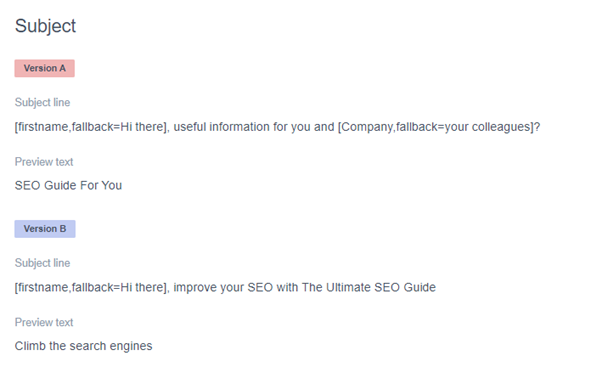
We test short and long subject lines, subject lines with including the recipients first name and / or company and try to answer the all-important ‘What’s in it for me?’ question in the Subject Line.
Improving your open rate is crucial to email marketing success and as a result I would always recommend testing the subject line.
5. The Preview Pane
The Preview Pane, sometimes called the reading pane, varies depending on how the recipient prefers to see their emails coming in and how they want to manage their inbox.
The important consideration here is that your recipient may see the Preview and decide to delete or not open especially if the email is image heavy with little text to entice them to open.
So, make sure you use the Preview text element and that it works well as a follow on from the Subject Line. Also ensure that if you have an image at the top, it isn’t too big as you want the recipients to see some text as then they are more likely to open it. Of course, adding calls to action as well as making the subject line as enticing as possible will help too.

Pro-Tip: Use descriptive alt tags on images as this could encourage the recipient to open the email.
6. Grab their attention

You have around five to 10 seconds to grab the recipient’s attention. How do you do this? My key tips would be:
- Optimise the subject line, preview text and top section of the emailer – all elements could encourage the recipient to open the emailer and continue reading.
- Answer the ‘What’s in it for me?’ question as soon as possible.
- Make the objective of the emailing clear unless you are testing intrigue for example.
- Summarise what you’re about to write about and why the recipient might find it of interest in the first sentence, and ideally ensure this can be seen in the Preview Pane.
- Write in the style of a letter rather than an advert.
- Write to the person as an individual and use more ‘you’s’ than ‘we’s’.
- Make it easy for the recipient to scan with sub-headings and bullet points and remember the principle of the ‘dual readership path’.
- Keep the emailer text clear, concise and accurate with short paragraphs, with the optimal length 200 words or less.
7. Body copy – content is the key
This is pretty much covered above in the Grab Their Attention section. The key is to keep it short and to the point and to encourage the recipient to take your desired action.
Always check that the emailing is of value to the recipient and that it answers the question ‘What’s in it for me?’.
Ideally edit the text to reduce the word count if possible, and make sure you check spelling, grammar and punctuation as part of the pre-send checks. There’s a separate article on this, The 21 Point Email Marketing Send Checklist which you can use as a way to check your emailer before pressing send.
8. The must have elements
The must have elements are listed below with some required by law. To ensure you are GDPR compliant you must include an unsubscribe option.
- Link to a web version – preferable at the top of the email
- Forward to a friend link
- Opportunity to unsubscribe link
- Display recipients email address
- Link to privacy policy
- Contact us and send feedback link
- Physical mailing address and company details
- Telephone number
- Since the Companies Act 2006, all companies should include:
A. Registered office address
B. Company registration number
C. Place of registration
The above are all pretty self-explanatory, but do get in touch if you have any queries.
9. Legislation

Firstly, it is worth noting that we are not lawyers. The below is provided as a starting point and if you do have any concerns then please do speak to a solicitor before undertaking email marketing. However, if you ensure the must have elements are covered and that it is easy for individuals to unsubscribe for B2B email marketing you should be sorted.
Below are some of key legislation related to email marketing:
- GDPR – please visit https://ico.org.uk/for-organisations/uk-gdpr-guidance-and-resources/
- The Companies Act 2006 – Companies must include their registered address, company registration number and place of registration on all their emails including email broadcasts.
- The European Directive on Privacy and Electronic Communication December 2003
- The Data Protection Act 1998
- Register with the Information Commissioner’s Office at https://ico.org.uk/. The data protection annual fee may vary but the tier 1 fee on 17 July 2023 is £40 per year or £35 if you choose to pay by direct debit.
- Make sure your Privacy Policy is up to date on your website and that you link to it in your emailing.
If in doubt, speak to a lawyer.
10. Technical considerations

The aim is to ensure as many of your emails as possible avoid the spam filters. There are ways to improve deliverability and they include:
- Ensuring you’ve completed Sending Domain Authentication – this is quite technical and involves authenticating the sending domain. Whichever email software you use, there will be some guidance on how to do this. For more information check out the article by Campaign Monitor on Email Authentication, or contact your software provider support team for the specific details related to your software.
- Avoid certain words such as free, deal, price, order, etc. There’s a long list available at https://blog.hubspot.com/blog/tabid/6307/bid/30684/The-Ultimate-List-of-Email-SPAM-Trigger-Words.aspx
- Make sure your images have been resized for email and compressed so the total email file size is ideally below 100KB.
For more tips on improving email deliverability please check out the HubSpot article; 29 Email Deliverability Tips You Must Know in 2022.
Conclusion
Email marketing set up doesn’t have to be daunting and whichever email marketing or CRM software you choose to use, there will be lots of guidance and support available to make the set up as easy as possible for you.
I do hope that you’ve found this article of value in helping with your email marketing set up.
In the final part in our B2B email marketing guide series, I will cover the steps you can take to improve your return on investment (ROI) from your email marketing.
Further Reading from Key Principles
B2B Email Marketing Guide – Part 1
B2B Email Marketing Guide – Part 2 (Strategy)
B2B Email Marketing Guide – Part 3 (Building a Mailing List)
B2B Email Marketing Guide – Part 4 (Choosing the Right Software)
The 21 Point Email Marketing Send Checklist
Five Ways to Integrate Your Email Marketing