Most digital marketing tools and tips work to bring people to your website, but what happens once they’re there? You don’t just want people to visit your landing page, you want them to take an action!
As David Freeman, a Senior Columnist at Search Engine Land, explained back in 2017, the user experience of a landing page is the pivotal future of SEO.
As Google Partners, we have put this checklist together in line with both Google’s current recommendations and our widespread experience of over 20 years in industry. This checklist will provide insights on how to create an excellent landing page that drives user action based on your business goals.
What is a landing page?
A landing page is part of a website that is designed for a particular objective, usually to generate leads. You may use a landing page to tell visitors about a specific service or product, often including images, descriptions and prices.
Should I make a separate landing page?
The main benefits of creating a separate landing page are:
- Reduced amount of navigation for users
Reducing the chances of them getting distracted and clicking off your site.
- Reduced bounce rates
Keep users engaged with a specific goal in mind (usually a call, download or enquiry for a specific product/service).
- Improved targeting and higher conversion rates
Not all users will be interested in all the products and services you sell, so narrowing down your audience helps you to focus your marketing efforts and create more tailored marketing messages.
- Better Google Ads quality score
If you’re running Google Ads, the landing page relevance and user experience is a significant factor in deciding what position your ads will have in the rankings. A better experience also allows for a lower cost per click.
Who’s your customer?
It’s essential to understand who you want to be viewing your landing page. Consider creating a customer persona, which is a visual representation of your customer’s interests, pain points and the benefits they are looking for.
Simply listing the features of your product service isn’t enough. Customers are more likely to convert when you can show the direct results of what your product achieves and the problem your product overcomes.
- What location?
If it’s location specific, consider tailoring your landing page for this.
For example, “Digital Marketing in Nottingham” instead of just a generic digital marketing page.
- Pain points
Aim to create a landing page that presents how your product/service can overcome these pain points and what the benefits are to your customer.
Use stats to describe the benefit of your service.
For example, if our target customer wants better conversion rates from their digital marketing, ours would be: “Helping car dealerships to increase their conversion rates by 30%”.
Stating the key features of your service could be best done through a simple bullet-point list further down the page, as this avoids important benefits from being missed in a large paragraph of text.
Remember to refer back to the customer persona and use a tone of voice and a range of images that resonate with your audience.
Make your landing page relevant to search terms
So, you’ve defined who your audience is, but how do you ensure the content is best optimised for what your customers are searching for?
- Keyword Research
If you haven’t already done so, using tools such as Google’s Keyword Planner can be a great way of ensuring you’re writing content that actually answers the questions your customers are asking.
You can also use AnswerThePublic, Google Trends and AlsoAsked to identify the questions your prospects are asking.
Once you’ve looked at the terms your customers are searching for, you can start optimising the content on your page for goal completions.
- Stay focused on one goal
For example, if your ad copy or social media post is talking about “car servicing in Nottingham”, don’t include motorbike servicing or clutch repair services on the landing page. Instead, put these into their own landing pages to only appeal to users that have followed through based on the original search term.
Create a hook (value proposition)
Somewhere within the headline of the page you should include the main benefit of your product or service, used as a carrot to make users realise why your product solves their problem.
For example ours would be:
“Get 30% more enquiries for your money with our highly optimised PPC services.”
Adding call-to-actions
A call-to-action (CTA) is the end goal of what you want your users to do, which is often a button, an email link or a phone number. These are short and clear segments of text that drive action, such as:
- Get a quote
- Download your free copy
- Enquire today
- Buy now
As an example (and a not-so-subtle plug), here is one of our ‘Get Your Free Audit’ call-to-actions in context:
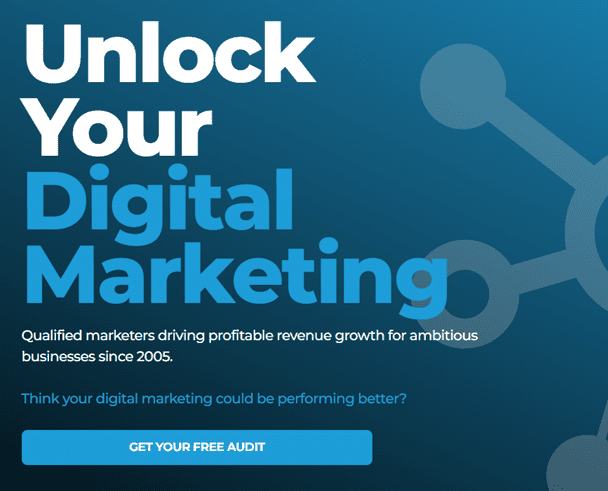
Notice how we briefly explain the service (the hook), the benefit of the service and then use the ‘Get your free audit’ button as a call-to-action.
- Have several, well-placed CTAs
For example, you might have one right at the top of the page right after copy that states the benefits of the product or service, designed for people who are highly interested in what you have to sell. We often recommend top right and ‘above the fold’ which means high enough that people don’t have to scroll on desktop, and straight after the initial benefits on mobile.
You may then have another CTA at the bottom of the page, designed for people who require more information and aren’t yet as eager to buy. If the page is long, you may also be best adding a CTA half way down the page too.
- Include contact information
Not everyone wants to fill out a form, so including your email and phone number is a great way of building trust with people. With Google Tag Manager and Google Analytics, you can track the number of people that click to call or email from your landing page.
Conversion Tracking
When monitoring the performance of your landing page, it is essential to keep track of which CTAs are performing the best. One of the best ways to do this is by installing Google Tag Manager (GTM) onto your website and setting up your conversion tracking through GTM. By implementing conversion tracking, you can monitor the number of enquiries, phone calls and sales based on your digital marketing efforts, giving you a clear understanding of what converts and what doesn’t.
It’s important to note that some sites are harder to install conversion tracking than others, so it is often best to consult an agency when implementing this.
We are currently offering a free digital marketing audit, which looks at the entire digital marketing mix implementation for your organisation, including how effective the tracking for your website is.
Custom Domains
Whilst custom domains aren’t the most important point on this list, URLs that are directly linked to the content on your landing page are proven to lead to higher conversion rates.
For example, you might consider buying the custom domain cardealerleadgeneration.com if you were a digital marketing agency specialising in the automotive sector.
Alternatively, it may be just as effective to use your current domain with a subdirectory for the specific service. For example for us, we use keyprinciples.co.uk/sectors/automotive/ for our automotive digital marketing services.
Deciding whether to use a custom domain, a subdomain or a subdirectory is one of many variables you can split test to optimise and improve your landing page.
How should I measure the User Experience (UX)?
There are many different tools to measure UX, however, Microsoft’s free ‘Clarity’ tool is a great one to start with. Here are some of the common UX metrics, what they mean and how you might interpret them.
Dead clicks
Definition – When a user clicks on a link on your page, and nothing happens.
This may be where a button or text that is styled as a link isn’t linked to anything or has a broken link.
Rage clicks
Definition – When a user clicks multiple times on the same area.
This is often due to a slow website, broken links or text that appears as a link but isn’t one. It may also mean that users are expecting more content on a topic when there isn’t any.
Excessive scrolling
Definition – When a user is scrolling through a page more than what would be expected.
This is often when users are trying to find the content they want, but the content structure is too complicated, messy or irrelevant for them to find it quickly.
Quick backs
Definition – Similar to bounce rates, this is where a user quickly returned back, after clicking onto the page, often due to an accidental link click.
Whilst this may be due to an accidental click from the user, it could also be interpreted as irrelevant content on that page.
Heatmapping features for UX
Microsoft Clarity has a heatmapping feature that allows you to visualize the user experience for people visiting your website.
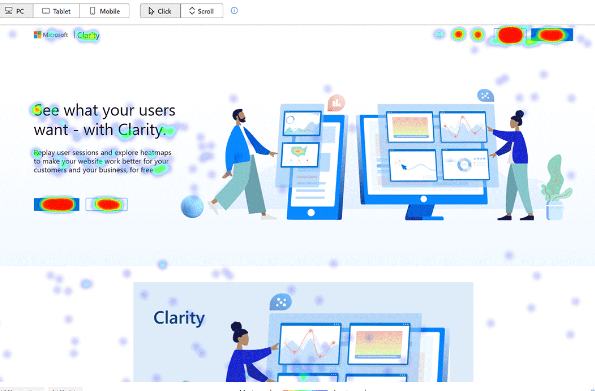
This is an excellent feature that allows you to see which call-to-actions, menus or links are the most effective on your site.
What changes should I make to improve UX?
So, you’ve analysed the data in your UX software, but you’re unsure what to do next. Here are some handy tips on what you might do next, based on different insights:
Call-to-actions not being clicked
Consider testing a new design or placement of where the CTA is. For example, it may be low down on the page, so it may be worth considering moving it higher up or nearer to highly relevant content.
Excessive scrolling
Is all of your content completed relevant to the user or is there content that could be removed/put into a new section? Often, we see websites with great content that is poorly structured, such as making poor use of bullet points and instead having huge blocks of text with nothing separating each important point.
Consider testing a new layout for your landing page, based on the data of how far people scroll down your page. If they don’t scroll very far, consider putting your CTA/buttons higher up on the page. Another element that plays into this is your page load speed, which is a significant ranking factor for both SEO and Google Ads.
How do I improve my page load speed?
- Keep file sizes small
One of the most common issues and the easiest to fix! Utilize free tools such as TinyPng and ShortPixel, which compress your images to a smaller file size without reducing the quality. - Keep your site updated
Ensure your site is up-to-date with the latest version of WordPress, or whichever website builder you have decided to go with. These updates ensure you’re on top of the latest technology, which is favoured by search engines and improves the user experience.
Although your load speed can be improved with the changes stated above, the biggest changes in load speed are often made through the way your site is built. For example, if you use a lot of plug-ins on your site, this can significantly slow down your site.
Tip: If you have plug-ins on your site that you are no longer using – remove them and it could help speed up your site.
Test your landing page speed for free
GT Metrix is an excellent free tool that we use for our clients to test how fast their sites are and the areas of the site that are slowing it down. Test your site speed in GT Metrix!
Is your page showing below a grade C in GT Metrix?
Not only is this likely to affect your user experience and conversion rates, but it’s likely to hamper your search engine rankings too! We can help to improve this, request your free website audit today!
Use ‘social proof’
Customers want to know that what you’re selling actually works! This could be done through a testimonial or even specific results.
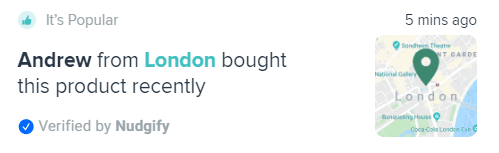
Tools such as Nudgify create automated on-page notifications of when customers purchases, downloads or leaves a review for your product. Although this may appear as pointless, websites that use these type of plugins help to create a sense of popularity and authority around the product or service when a future customer is viewing the page.
Testimonials
If you have happy customers and have delivered them exceptional results, it’s essential to make sure your future customers know about it.
For example, ours might be:
“We achieved 97% more enquiries and a 44% increase in conversion rate when we worked with Bradbury Flooring”
The client said:
“The campaigns have performed so well that we are now full booked up for the next three months and we’ve over £15k worth of quotes to follow up on.”
Should I use a chat-bot on my website?
Chat-bots have been proven to increase the conversion rates of many websites, as they allow users to quickly ask for more information about a product or service instead of going through the longwinded process of enquiring. However, there are downsides. One of these is that the chat bot will require either automation or someone on-call to answer the questions put through to the bot. Also, some chat-bots require professional web developers to implement.
Optimising landing pages for Google Ads quality score
Here is a short summary of the guidelines for creating landing pages for Google Ads. Following these guidelines are an excellent way to improve conversion rates and gain a higher quality score too, helping towards a lower cost per click and higher rankings.
- Specific
Don’t use your home page for Google Ads as this will make the ads less relevant to customers. Instead, make a custom landing page that is specifically designed to have similar keywords and product/service information to the terms the user is searching for and to those found in the ads themselves. It is also important to have the same call-to-action on the landing page as you have in your adverts so that your users know exactly what you want them to do at every step of the journey. - Relevant
Ensure that the landing page provides the information that the search terms are asking for. It is important to add in plenty of negative keywords in order to ensure people don’t see your advert for irrelevant searches. If they click through to your landing page, they will be disappointed to not find the answer they were looking for. - Trustworthy
Ensure that your site is encrypted. In 2017, Google announced that HTTPS encryption was a ranking factor for both SEO and Google Ads. If your site isn’t encrypted, not only does this present the risk of your customer’s data being leaked, but it also leads to lower conversion rates due to low trust. Our free digital marketing audit covers all the essential steps to building and maintaining a trustworthy website.
Another way to gain trust is by adding client testimonials and reviews to your landing pages, statements from happy customers are the best form of influencer marketing and should always be visible. - Easy to navigate
Websites that are easy to use, particularly for mobile devices, are favoured by Google’s algorithm, both for Google Ads and SEO. Therefore, it is essential to follow a mobile-first approach when building your site. If you are unsure as to whether your site is responsive for mobiles, contact our team and we can tell you.
In addition to a responsive site, ensure that there aren’t too many big blocks of text and try to split the text up with videos, images or graphics. - Reliable
Testimonials, accreditations and qualifications can help with building trust with your future customers.
Learn more about our Google Ads services.
Ideal landing page structure
Using the tips mentioned throughout this article, we believe that a high converting landing page might look like this.

If you need any help with your digital marketing then please do get in touch, simply call us on 0115 880 0211, email hello@keyprinciples.co.uk or complete our contact form and we will be in touch.
Digital Marketing Training
Want industry-standard digital marketing knowledge but don’t want to outsource to an agency? As Google Partners with over 15 years in business, we help in-house marketing teams to keep on top of their knowledge, whether it’s SEO, PPC, social media or web development.
We are currently offering a free digital marketing training consultation, providing you with areas where you may be able to improve your team’s performance!