
Performance Max campaigns allow advertisers to reach customers across Google’s wider network through one automated campaign. That reach is valuable. However, it creates a longstanding frustration: advertisers have not always been able to see why a campaign serves strongly on some channels but barely appears on others.
With the Channel Diagnostic feature in the Google Ads platform, that picture is much clearer. The feature brings potential delivery problems together within the Channel Performance report. It means advertisers can identify missing assets, policy restrictions and other issues that may be limiting individual channels.
This does not make every part of Performance Max transparent, nor does it mean that low activity on a channel always signals a problem. However, it should reduce the time spent searching through asset groups and separate reports for explanations.
Why Performance Max visibility has been a problem
Performance Max is designed to run across Google’s advertising inventory from one campaign. Depending on the campaign and its available assets, adverts may appear:
- In Search results.
- On YouTube,
- Across the Display Network.
- In Discover.
- In Gmail.
- Through Google Maps.
Instead of assigning a separate budget and set of adverts to every channel, the advertiser provides the goals, budget, bidding targets, audience signals and creative assets. Google then decides where and when the campaign is most likely to produce the required result.
This is all part of the Performance Max appeal. Your campaign can respond to changing demand and reach potential customers as they move between searching, browsing, watching videos and visiting physical locations. Booking a strategy session with Key Principles is a good shout for anyone trying to get to grips with this. Especially as it has also made performance more difficult to interpret.
An advertiser might see that the campaign is generating conversions. But with that, you might not have any indication as to YouTube is receiving considerable delivery while Display is receiving very little.
A channel might be restricted by a missing video, location asset, product feed issue or policy decision. Alternatively, nothing may be wrong. It could just be that Google is finding stronger opportunities elsewhere.
Those possibilities require very different responses. Without clearer information, advertisers risk changing budgets or bidding targets unnecessarily. Also, genuine eligibility problems can go unnoticed.
Channel Diagnostics is intended to close that gap. This addition separates identifiable restrictions from ordinary automated allocation. This should make troubleshooting faster and campaign decisions better informed.
What Google has recently added
Google has placed Channel Diagnostics inside the existing Channel Performance report. It hasn’t created a separate report.
You can find it by opening the Performance Max campaign and going to Insights and reports > Channel performance. This page already shows how the campaign is delivering across Google’s inventory; diagnostics adds a clearer layer of explanation around potential restrictions.
Advertisers can begin with an all-channel view to scan the campaign as a whole, then select an individual channel. This is useful when a channel is receiving little or no delivery, or when the channel mix changes unexpectedly. Instead of manually checking each asset group, the status column points to where attention may be required.
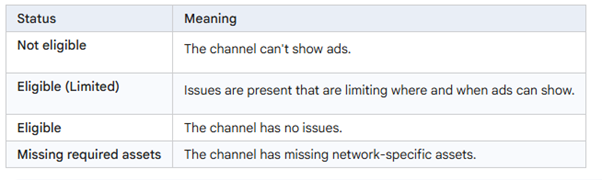
Image source: About the channel performance report for Performance Max – Google Ads Help
Advertisers can hover over a status for more information or select View channel diagnostics to see detailed guidance. This may identify the exact asset type, policy issue or other limitation requiring action.
The status should be treated as a diagnostic, not a performance grade. Eligible does not mean a channel should receive equal spend or will produce a strong return; it only means no diagnosed issue is blocking it. Equally, an Eligible (Limited) warning identifies a restriction, but does not necessarily mean the entire campaign is underperforming. It provides a clearer starting point for investigation.
Whilst not yet released to UK accounts, in late August of 2026 Google started testing new channel prioritisation controls. This is still in beta and is restricted to invite-only testing currently, but if rolled out this will allow accounts to influence how the algorithm weights specific channels, giving advertisers the options to prioritise better performing channels and save valuable budget on wasted spend. Typically, feature testing can last a few months so we could expect to see this in our accounts for the early part of 2027 if it is officially published.
What Channel Diagnostics can reveal
The most useful part of Channel Diagnostics is that it moves beyond showing that one channel is receiving less traffic. It attempts to identify a specific restriction that may be contributing to the difference. This turns a general observation into a more practical task. Because Performance Max builds different advert formats from the assets supplied, one missing element may affect certain placements while the rest of the campaign continues to run.
| Possible issue | Channels or formats affected | What it may mean |
| Missing image assets | Display, Discover, Gmail and some YouTube formats | A required square or landscape image may be missing or disapproved, preventing Google from creating certain visual adverts. |
| Missing video assets | YouTube | The campaign does not have a suitable video available. This may reduce its ability to access video placements effectively. |
| Missing headlines | Search, Display, Discover, Gmail and YouTube | Google may not have enough eligible text assets to create the advert combinations required for particular formats. |
| Missing descriptions | Search and visual placements | Required descriptive copy may be absent or disapproved, restricting the combinations Google can assemble. |
| Missing location assets | Maps | The campaign may be unable to show location-based adverts because no suitable business location is linked or eligible. |
| Product feed issues | Search and other placements using product data | Products may be disapproved, out of stock or missing important information. The Merchant Center account could also be inactive, invalid or suspended. |
| Policy restrictions | Any affected channel | An individual asset or complete asset group may have been limited or disapproved because it does not meet Google Ads policies. |
| Landing-page limitations | Search | Final URL expansion may be switched off, or the available landing pages may not provide a suitable match for relevant searches. |
The detailed view should show whether the issue affects the entire campaign, a particular asset group or only one channel. This helps you decide what to address first. A missing location asset may be important to a business relying on local visits, for example. If you’re an online-only service, however, it may have little relevance to an online-only service.
Start with any issue that stops a channel from showing adverts at all. Once those problems are resolved, look at warnings that limit the types of advert Google can create, such as a missing video or image.
Fixing these issues makes more placements available to the campaign, but it does not mean Google will divide the budget equally between Search, YouTube, Display and its other channels. Performance Max will continue directing more of the budget towards the places where it predicts conversions are most likely.
How to use the information
To get the most out of Channel Diagnostics, include it in your regular ROI-focused PPC management and ongoing campaign reviews. Treat each warning as a starting point for investigation. It doesn’t mean you need to make an immediate campaign change.
1. Open the Channel Performance report
Select the relevant Performance Max campaign. Then, go to Insights and reports > Channel performance. Start with the all-channel view so you can see whether Search, YouTube, Display, Discover, Gmail or Maps has been given a warning.
2. Check the status of each channel
Look first for channels marked Not eligible, Eligible (Limited) or Missing required assets. If a channel is showing as Eligible and is receiving little traffic, it doesn’t necessarily mean it has a technical problem. Google may be finding better opportunities elsewhere instead.
3. Open the detailed guidance
Hover over the warning or select View channel diagnostics where you’ll see Google’s explanation. Does the issue apply to the whole campaign? One asset group? One particular channel? Knowing this means you won’t mistake a localised problem for a campaign-wide failure.
4. Confirm what has happened
Find out whether an asset is genuinely missing or has been uploaded but disapproved. A missing image, headline or video needs to be created in the correct format.
A disapproved asset requires a different response: review the policy decision, correct the problem and, where appropriate, request another review. Product feed warnings may need to be investigated in Merchant Center rather than within the campaign itself.
5. Prioritise the most restrictive issues
Deal first with anything preventing a commercially important channel from showing adverts. Next, address warnings that restrict useful formats or reduce the range of adverts Google can build. Record what was changed and when.
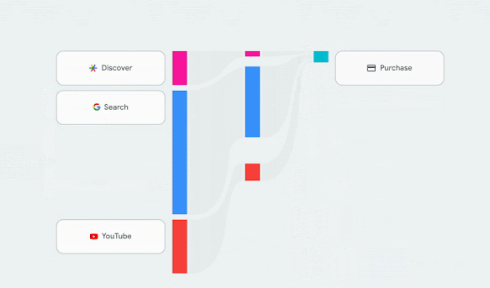
Image source: About the channel performance report for Performance Max – Google Ads Help
Avoid changing assets, budgets, bidding targets and conversion goals at the same time. If performance then improves or declines, it becomes difficult to identify the reason. Make related changes in stages, allow time for approvals and new data to appear, then return to Channel Diagnostics to confirm whether the original warning has cleared. Campaign-wide CPA, ROAS and conversion quality should still determine whether the change has produced a meaningful improvement.
Different channels need different assets
Performance Max does not use one fixed advert across every channel. Google assembles different combinations from the available assets. Search may rely heavily on headlines and descriptions, while Display and Discover require suitable images and logos. YouTube needs video, Maps may depend on location assets and retail formats can draw information from a product feed.
This means a campaign can remain active and continue generating results while being unable to access some formats or placements. If a square image, video or location asset is missing, Google may still serve adverts elsewhere. Without channel-level diagnostics, the gap may not be immediately obvious.
Meeting the minimum asset requirements is only the starting point. One eligible image or a few text variations may allow the campaign to serve, but give Google fewer options across audiences, messages and screen sizes. A broader selection of useful assets can help the campaign adapt its creative to the available placement.
Quality matters as much as coverage. Headlines should communicate a genuine benefit, images should be clear and recognisably on-brand, and videos should be created for the way people use the channel. Adding weak, repetitive or irrelevant assets simply to fill every slot is unlikely to help.
A complete asset review should therefore ask two questions: can the campaign appear everywhere it needs to, and does it have strong enough material to make those appearances worthwhile?
What Channel Diagnostics cannot tell you
Channel Diagnostics makes it easier to find technical restrictions, but it does not provide a complete explanation for every performance decision. If a channel is marked Eligible but receives little delivery, that does not automatically indicate a problem. Performance Max may be directing more of the budget elsewhere because it predicts a stronger return at that moment. Trying to increase activity on one channel for its own sake could weaken the campaign’s overall results.
Nor can the diagnostics decide whether the information guiding the campaign is commercially sensible. It may confirm that conversion tracking is active, but not whether the business is measuring and valuing the right actions. If a campaign treats a low-quality enquiry or simple page visit as valuable, Google may optimise towards those actions. The report also cannot determine whether a target CPA or target ROAS is realistic for the available budget and profit margins.
Channel-level figures need context too. Someone may first encounter the business on YouTube, then return through Search and convert later. Attribution and conversion delays can affect how that journey appears in the report. Google therefore advises advertisers to consider overall campaign performance alongside individual channel data.
Channel Diagnostics should be used as a troubleshooting tool, not a complete campaign scorecard. After resolving genuine restrictions, review conversion volume and value, CPA, ROAS, lead quality, sales and profit. If results remain weak despite every channel showing as Eligible, the investigation must widen to conversion goals, tracking, bidding, landing pages and the wider advertising strategy.
A clearer view, but not the whole picture
Channel Diagnostics is a useful addition to Performance Max. It should help advertisers identify missing assets and other restrictions more quickly, reducing the amount of time spent searching for possible causes of limited delivery. However, the information still needs to be interpreted alongside the campaign’s wider results and commercial goals.
Fixing a warning may make more placements available, but it does not guarantee stronger performance. Effective PPC management still depends on accurate tracking, realistic bidding targets, strong creative and regular review.
If you need help understanding or improving your Performance Max campaigns, contact Key Principles.