
You want more customers, so you set a Google Ads budget. Deciding how much to spend is only one factor to consider. Where that money goes matters too. In particular, when you have different parts of a campaign that produce very different results.
Google is introducing channel prioritisation and budget allocation controls across several campaign types. These mean you have another way to influence spending across eligible networks. Availability of these is being rolled out progressively. Google’s announcement explains the thinking behind the update.
So far, business owners are wondering whether these settings could help them spend more effectively. As with all things business-related, it means analysing your own results, priorities and appetite for testing and looking beyond the announcement.
Why where you spend deserves attention
UK search advertising investment reached £17.9 billion in 2025 according to IAB UK’s Digital Adspend study. This accounted for 44% of digital advertising spend.
That figure covers the search advertising market as a whole. It includes platforms beyond Google too. If you’re looking at this from an individual business perspective, the more useful question to ask is how much of your own spending brings in worthwhile customers.
If you have a campaign that delivers an acceptable average cost per enquiry, it might still contain areas worth investigating. Some enquiries might become customers quickly. Others might never progress beyond an unanswered email.
You want your budget decisions to connect your campaign performance with what your business wants (and needs) to achieve. Before you choose where to spend more money, it’s important to thoroughly understand where you are currently and what your existing budget and spending delivers. Key Principles’ PPC management services can help you assess what your existing spend delivers and where changes could improve results.
With that understanding, you can decide whether Google’s new controls are useful in helping you adjust where your money goes.
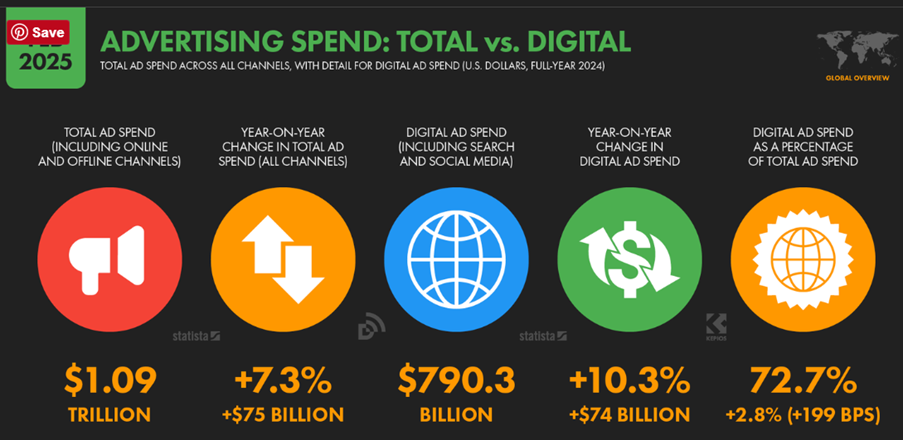
Image source: Digital 2025: global advertising trends — DataReportal – Global Digital Insights
What the new controls do
The new controls give you two ways to influence spending. You can choose which channels are prioritised and can set an allocation for those given a secondary role.
Channel prioritisation
Assign eligible channels a High or Low priority. Google prioritises spending on High priority channels before allocating remaining budget to Low priority channels, within your performance targets when using Target CPA or Target ROAS.
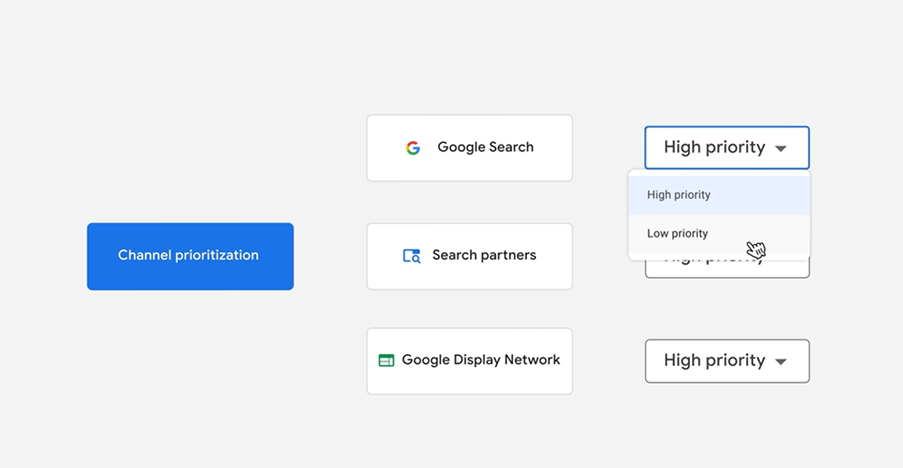
Image source: New Google Ads channel prioritization and budget controls
Budget allocation
Set an optional percentage limit for a Low priority channel. Google aims to keep spending within that allocation. This is described as ‘best effort’ rather than guaranteed.
Think of the difference between preference and allowance. A preference tells the system where you would like spending to happen first. An allowance sets a spending boundary for a secondary option.
This gives you another way to approach a network you are unsure about. You might want to test its ability to bring in customers without giving it the same spending priority as a proven source.
Assigning Low priority won’t guarantee that a channel will receive spending. Your test needs to account for that possibility when you review the results.
Which campaigns and channels are included?
Google’s announcement identifies Search, Shopping, Performance Max and Demand Gen as the campaign types receiving the rollout. The available groupings differ:
| Campaign type | Available channel groupings |
| Search | Google Search, Search partners, Google Display Network |
| Shopping | Google Search, Search partners |
| Performance Max | Google channels, Search partners, Google Display Network |
| Demand Gen | Google channels, Google Display Network |
In Performance Max and Demand Gen, properties including Search, YouTube, Maps, Gmail and Discover sit together under Google channels. These controls do not provide separate budget allocations for each of those properties within Performance Max.
Google’s current help guidance also specifies that Demand Gen supports channel prioritisation but does not support budget allocation. Look at all the options available in your account before you plan a test around them.
If you’re not familiar with Google Ads, the names can be confusing. Search partners means that advertising isn’t just on Google Search and can be placed on partner sites and locations. The Google Display Network provides advertising space across websites and apps. It means it reaches people while they browse. It’s not just for when people are actively searching.
Those are different advertising environments. Whether to include either should be a decision that comes from its role in your marketing and the results it produces.
How might a business use these controls?
Imagine a local installation business whose Google Search enquiries regularly turn into suitable jobs. It has previously excluded Search partners because it wanted to concentrate its budget on its established source of customers.
The business now has capacity for more work and wants to investigate another source of enquiries. A possible approach would be to give Google Search High priority, set Search partners to Low priority and choose a limited allocation for that secondary network.
The purpose would be to find out whether Search partners can contribute worthwhile business while keeping Google Search as the preferred destination for spending.
This is a hypothetical use case, rather than a recommendation for every installation business. Before you look into expanding reach, you should look at an existing campaign and think about whether it is performing well enough to start with.
If your current enquiries rarely become bookings, you might just end up creating more work for the sales team by adding another source. Before you decide to test something new, work on solving that problem first.
At Key Principles, our recommendation is to start with the commercial problem you want to solve. A new setting is useful when it helps address a problem you have and not exacerbate it.
Understand what a percentage means
The allocation percentage uses the campaign’s average daily budget. It is not based on actual spending. A hypothetical £100 average daily budget with a 10% allocation gives Google a £10 daily reference limit for that channel. It is not a guaranteed £10 ceiling.
If actual campaign spending were £50, that £10 would be 20% of the amount spent. This explains why a report’s spending share might look different from the percentage you entered.
It is useful to know this when agreeing expectations with colleagues. Someone authorising a test may interpret “10%” as ten pence in every pound actually spent.
It’s a good idea to separate your desired test allowance from the amount of variation your business can cope with. If you’re a small company that needs to watch cash flow closely, you won’t need the same approach as an established advertiser who has room to absorb uneven results.
If your plan depends on an exact daily maximum for a particular network, you won’t get that certainty from a best effort allocation. Make sure the person approving the test understands the limitation behind it.
How good are your enquiries?
Before you adjust where money goes, think about what a useful result is. For a local service business, it might mean an enquiry within its service area, for a job it can undertake, from someone ready to discuss a booking. A form submission on its own will not answer all those questions.
Consider this hypothetical comparison. One source produces 20 enquiries from £500 of spending. Another produces ten from the same amount. The first looks cheaper at £25 per enquiry, compared with £50 for the second.
But suppose the first produces two customers and the second produces four. Acquisition costs are then £250 and £125 respectively. The apparently expensive source has delivered customers at half the cost, before considering differences in order value or margin.
These are illustrative figures, rather than predicted results. Looking at things in this way can show you why if you base a spending decision only on enquiry volume, you can end up going in the wrong direction.
Look at which enquiries received quotes and which became customers. That information makes a budget review much more useful than looking at form submissions on their own.
Give each test one clear purpose
A useful starting point is a short written hypothesis: “We want to find out whether this additional source can generate suitable enquiries at an acceptable customer acquisition cost.”
Then define what suitable means and what evidence would justify continuing. Include:
- A financial measure.
- A quality measure.
- A review date.
Avoid making other changes at the same time like the landing page, offer, targeting and channel settings. This will help you to understand how this single adjustment affects results. When several things change at once, you can’t see where the improvement comes from, which means you can’t repeat it.
In terms of test percentage, there is no universally sensible allowance. Choose something that your business can afford and that has a realistic chance of providing useful evidence. If you want help, a free strategy session with Key Principles can bring together your account review and wider commercial goals.
Afterwards, review the whole campaign. Did customer volume increase? Has acquisition cost stayed acceptable? Are staff filtering more unsuitable enquiries? But before doing this, be sure to allow time for leads to become sales before drawing conclusions.
If you have an online shop, think about the economics of the orders and not just revenue. An order containing heavily discounted products can have a different value to the business from an equally priced basket of higher margin stock.
Be honest about uncertainty too. If the test has produced very little activity, the sensible conclusion may be that there is insufficient evidence. That is more useful than declaring a channel successful or unsuccessful to make the report feel complete. Record what remains unknown before deciding what to do next.
Check how priorities interact with bidding
Google says prioritisation alone generally has little effect on Target CPA or Target ROAS campaigns that are not limited by budget. Allocations for Low priority channels can still apply.
Target CPA concerns cost per acquisition. Target ROAS concerns return on advertising spend. If your campaign uses either, ask whoever manages the account to explain how its targets and available budget affect the proposed change.
For example, marking a channel High priority does not instruct Google to ignore your acquisition cost target to spend more there. The relationship between the settings matters when deciding what change to expect.
This is one reason to review the campaign before changing priorities. If an unrealistic bidding target is restricting activity, a different channel preference may leave that underlying problem untouched.
Where to check your settings
Once the feature is available, open the relevant campaign’s Settings and look for the Channel Prioritization card. Campaign settings can override account defaults. Check which settings currently apply before editing them.
Treat this as a review first. Identify the campaign type, bidding approach, enabled networks and current performance. Then decide whether there is a reason to change priorities or introduce an allocation.
If you use an agency to manage the account, ask them to explain the proposed change using your campaign as the example. You should understand what it aims to achieve and how success will be measured.
Put February 2027 in your account review
Google says the existing Display Expansion spending arrangement for affected Search campaigns will change from February 2027. Its guidance for retaining the current configuration is to set the Google Display Network to Low priority with a 50% allocation.
That is migration guidance. This isn’t a recommendation as every not every advertiser is the same and some won’t want to spend half their budget on Display.
Before this date, you should arrange to review your affected campaigns. Consider their current settings, why Display is enabled and whether its contribution supports your business objectives. Then decide whether keeping the existing configuration is desirable.
Conclusion: Make the decision around your business
The new controls are worth understanding because they are another way you can influence where your Google Ads budget goes. Whether you should use them depends on your campaigns and what you want to achieve.
To summarise:
- Start by identifying the problem you want to solve.
- Check that your reporting reflects useful customers and sales.
- Understand which settings are available.
- Agree a proportionate test where there is a clear reason for one.
You may decide to trial an additional source, adjust an existing allocation or leave a successful campaign alone. Each can be a sensible outcome when supported by clear reasoning.
If you would like help identifying affected campaigns, reviewing where your budget is going or deciding whether a test is worthwhile, contact Key Principles. We can help you assess the options against the enquiries, customers and sales your business needs.