Do you ever look at your Google Ads metrics and wonder why no one is clicking? You are not alone. Many businesses using the Google Ads platform often fall short when it comes to CTR, and actually getting customers across the line and directed to their landing pages.
Don’t be disheartened though. This obstacle can be overcome. You can increase your ad’s click-through rate and bring it in line with your industry averages. To do this, a concerted and strategic approach is required.
You must understand how CTR works, why it’s important, and the specific things you can do to draw your customers in. This is what I dissect below and after reading this article you will have a range of actionable tips that you can immediately implement for your PPC campaigns.

What Is CTR And Why Is It Important?
CTR = Click-Through Rate
This is a key metric to analyse the effectiveness of your Google Ads campaigns. It looks at how many people who have viewed your adverts, click on them. This simple metric can be calculated using the following formula:
CTR = (Total Clicks / Total Impressions)*100
For example, let’s say you have an ad that has ran for a week. During that period, it’s had 500 impressions, and 20 clicks. This ad has a CTR of 4% = (20/500)*100. The higher the percentage, the better. Your CTR metric is important for the following reasons:
- It directly links to a higher quality score with Google.
- It often results in a lower CPC (cost per click).
- It gives you a higher chance of making conversions.
- It means your ads are relevant and good quality.
Firstly, click-through rate is one of the factors Google looks at to determine your quality score. A higher quality score lowers your cost per click. This means your ads have a higher ad rank for less cost that your competitors are likely to pay for the click – and in turn, your PPC marketing budget stretches further.
Secondly, the more people clicking on your ads, the more ‘in market’ visitors to your website and this leads to additional revenue generated which is ultimately the end goal. A high CTR is also a great quality indicator and shows that your Google Ads campaigns are ticking the right boxes.
What CTR Should You Aim For?
Before we jump into the tips, it’s vital you understand the context of click-through rates and temper your expectations. In general, click-through rates on Google Ads are low and rarely get above 10%. Don’t expect much more than this – even after implementing the advice below.

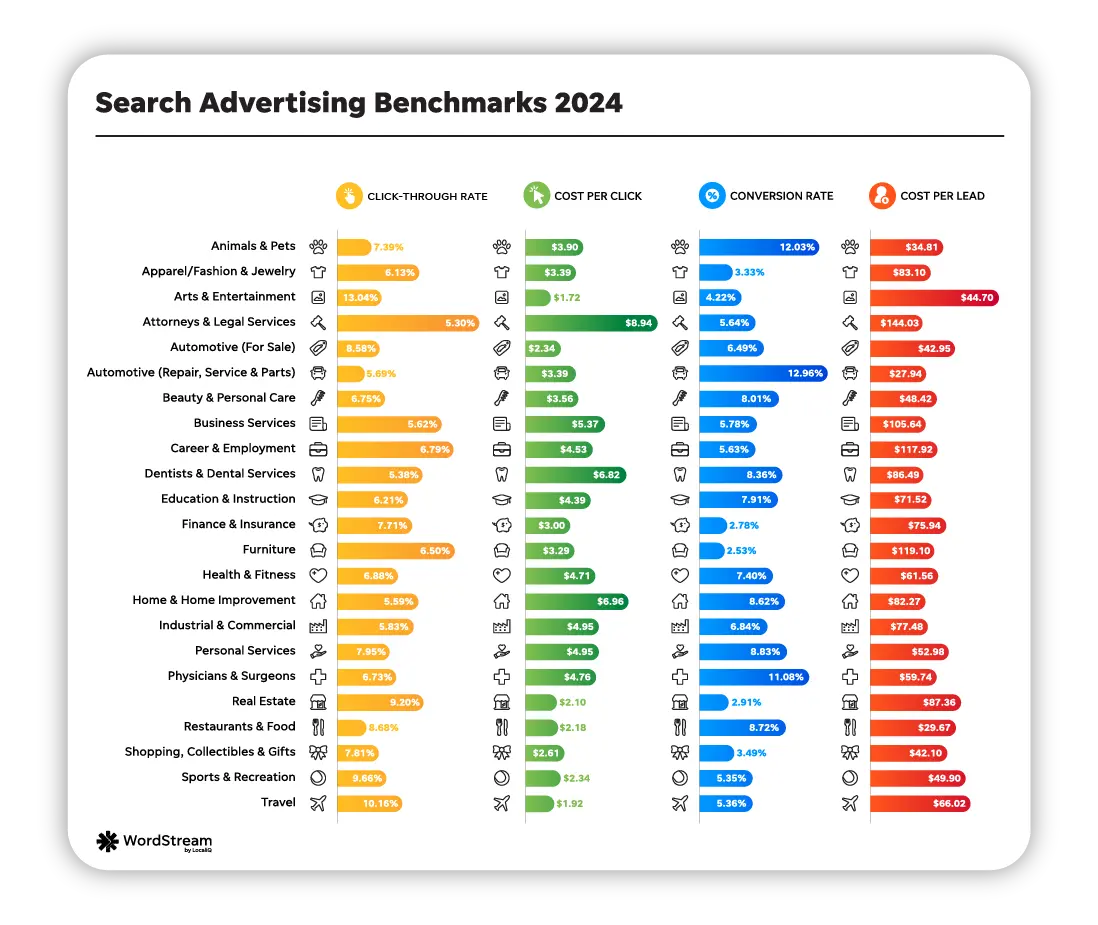
However, although CTR percentages are low, the benefit of Google PPC is the huge audience, small expense, and ability to control your budget. I recommend researching the average CTR for your industry as a benchmark so you know what to work towards. Some examples include:
- Legal: 5.30%
- Automotive: 8.58%
- Home Improvements: 5.59%
- Apparel: 6.13%
- Industrial & Commercial: 5.83%
- Travel: 10.16%
If you have been running your campaigns for a while then you have some really valuable data in your account to help put these benchmarks into context. You should be analysing this data looking for when your CTR was at it’s highest, if you’re already performing better than your industry benchmark then you have a new target.
Keep in mind any fluctuations if your business is seasonal, but always strive to be better than last week, last month or last year.
8 Ways To Improve Your Click-Through Rate
So, you know why CTR is beneficial, and you have a clear idea of industry benchmarks and realistic expectations for your campaigns. Now we can look at 8 simple ways to improve the click-through rates of your Google Ads account.
Implement Negative Keywords
Negative keywords are keywords that you DON’T want your ads to be displayed for. They can be instrumental in keeping your ads targeted and focused on your ideal customers.
By adding negative keywords, you can make sure your ads are always targeted to people who are more likely to click on them. This also prevents wasted budget on ads that end up displaying to customers who would never have any intention of buying what you are offering.
Include A Clear CTA
A call to action nudges your customer in the right direction and tells them what you want them to do. Without a clear CTA in your ads, customers may not know how to proceed or take the next step.
We have to respect the intelligence of our customers, but at the same time, there are instance when it’s better to hold their hand and walk them through the process. This holds true for Google Ads and you must include a CTA in your copy. Make it clear, make it visible, and make sure the CTA is relevant to your ad content and user search intent.
Use All Of The Ad Extensions
For each ad campaign you can utilise Google Ad Extensions. These add additional information to your ads – either clickable or non-clickable and they are proven to help improve Google Ads click-through rates. There are multiple extensions available that can directly improve your CTR, these include:
- Call
- Callout
- Price
- App
- Image
- Structured Snippet
- Sitelink
- Location
Most of these are self-explanatory and which ones are relevant depend on your business and industry. For example, the call extension allows you to add a contact number to your ads. A customer searching on a mobile can then simply click the call button to instantly contact you.
Similarly, the sitelink extension adds additional links underneath the main ad content. For example, your main ad content could link to your specific landing page content. However, you could ad a sitelink extension to include more links to specific product pages or promotions that are relevant to the search.
Research the different Ad Extensions and try implementing them int your ad copy. The more the better.
Optimise Keyword Use

Keywords form the backbone of your Google ads and have a direct link to CTR. These are the words and phrases that customers have searched for on Google for your ads to appear. Consider inserting keywords into the following areas:
- Display URL path
- Ad headline
- Ad description
You can also consider dynamic keyword insertion. This is a process where Google Ads automatically updates your copy to include keywords that resulted in your ads being displayed.
Make Sure Your Ad Copy Shines
I know that this seems obvious, but it always surprises me how businesses fail to pay enough attention to their ad copy. If your ad copy is dull, unengaging, or irrelevant, customers aren’t clicking! There are some simple things you can do to make your ad copy shine:
- Include the most important information in your ad headlines.
- Make sure your ad copy is relevant to the expected search query.
- Match the ad copy language to the customer’s search intent.
- Check spelling and grammar!
- Include a USP (Unique Selling Point) that makes your ad stand out.
- Try to connect emotionally with the potential customer, help to solve their problem.
Use as many of the characters and additional assets as possible, this not only helps improve your quality scores but also helps to increase the footprint of your ad space on the results page, your ad will stand out against your competitor’s ads and push them further down the page.
If you are selling something in your ad – whether it’s a product or service, unless there is a very good reason not to, you should consider highlighting the price! Quite often the price is one of the main factors. If buyers can see the price clearly in the ad copy, they instantly know if it’s something they can afford.
The more information you can give to your potential customers before they click your ad (such as price, features, benefits and availability), the more likely they are to make a decision and continue.
These simple tips should drastically improve your ad copy and make your written content much more appealing to potential customers. Don’t be afraid to experiment with different copy and run multiple ad iterations too.
DON’T duplicate you’re the content in your headlines, descriptions and ad extensions, this will only waste the very limited character space available and it doesn’t look great.
Test Multiple Ad Variants
For Google Search you can have up to three Responsive ads active per ad group. This type of A/B testing is invaluable as it allows you to test multiple ad iterations, pit them against each other, and see which ones give the highest CTR.
Don’t expect to stick with one ad and for it to work flawlessly. Be proactive and test multiple variants of your ads with different copy, headlines, links, ad extensions, and keyword placement. The more you test, the more data you have, and the easier you can see which ads yield the best Google Ads click-through and conversion rates.
You can take a multi-tiered approach too. For example, you could start with 3 ad variants. After testing those three, you might find that one or two particular ads gives higher click-through rates. You would then dismiss the other variant and create another variant of the most successful ad, and test those. Rinse and repeat this several times and you should make continual progress.
Improving Click-Through Rates Must be an Ongoing Process
I hope you have found this article useful and you have some actionable tips that you can put to good use immediately.
To finish, I want to reiterate the importance of continual monitoring and adjustment. Your Google Ads campaigns are something that must be worked on. You can’t expect perfect results without trial and error and it’s important to regularly review metrics like CTR and look at ways to improve your strategies.
This will ensure your PPC marketing campaigns are robust, and that you can quickly adapt them to changing circumstances. If you have yet to create your first Google Ads campaign, or feel you need assistance, please contact us. We have years of experience working in Google Ads and are eager to help.