
Businesses often expect instant results with Google Ads and although this is possible, and the platform is beneficial for your marketing, there can be situations where your Ads simply don’t appear to work.
This can be alarming when you have potentially spent a lot of planning time and marketing budget on it already. However, there are usually specific reasons for Google Ads failure. In the below guide, I provide a simplified 4-step process you can follow to help define the problem and help identify ways to solve it.

Step 1 – Define The Problem With Your Google Ads
You first have to define what the specific problem is before you can tackle it. If you don’t have much PPC experience, consider contacting us and we can use our years of knowledge to help troubleshoot and improve your ads.
Alternatively, if you want to try and find the problem yourself, it is usually one of three types of problem. Either:
- Your ads are not being displayed by Google at all.
- Your ads are being displayed, but no one is clicking on them.
- People are viewing and clicking on your Ads, but you aren’t getting any or enough sales or leads.
You should be able to see clearly from your Google Ads and Google Analytics reports which problem it is, you just need to know which metrics to look at.
For example, if it’s the first issue, your ads won’t show any impressions in your Google Ads account.
Alternatively, if it’s a lack of clicks, your Click Through Rate (CTR) will be low on Google Ads.
Lastly, if it’s a lack of sales and enquiries, you should see this from your website conversion data.
Step 2 – Your Ads Are Not Showing
The first problem with your PPC campaign could be an underlying technical issue, there may be issues with the campaign setup and targeting, or complying with Google Ads policies. This should be the starting point so you can rule out any simple technical mistakes.
Is Your Google Ads Account Suspended?
Providing your account isn’t brand new, there is the possibility that Google has suspended your account. If Google deems you have made an “egregious policy violation” they will suspend your Google Ads account. Let me be clear – I don’t expect any of you to be hit with this, but it’s still important to understand what qualifies as an “egregious policy violation”, so you can be sure to avoid it:
- Circumventing systems
- Coordinated deceptive practices
- Counterfeit
- Malicious software
- Promotion of unauthorised pharmacies
- Unacceptable business practices
- Trade sanctions violation
- Sexually explicit content
Circumventing systems means that you have done something to try and interfere with the Google Ads platform to improve your standing or ad’s performance. The other egregious policy violations are self-explanatory.
If your account has been suspended, you can make an appeal and contact Google Ads to see the reason for the suspension. If your appeal is unsuccessful, you will be permanently banned from using the Google Ads platform.
Are Your Ads Violating Google Ads Policies?
The easiest way to identify this is to head to Policy Manager within the Google Ads interface:
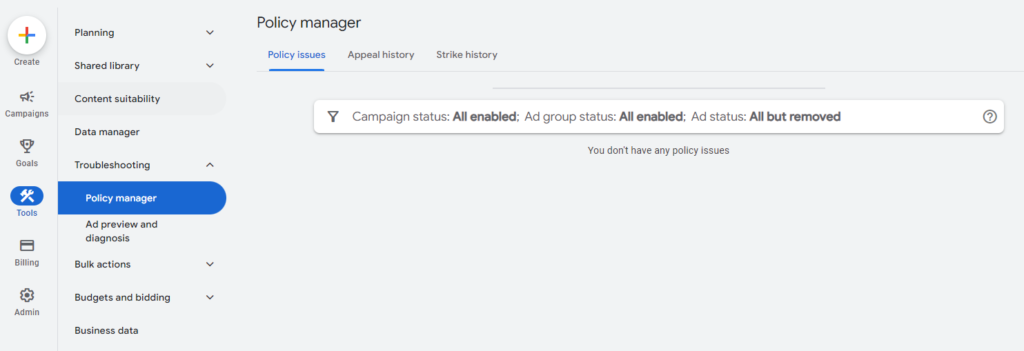
Egregious policy breeches are the ultimate offence, but Google Ads also has four main advertising policies:
- Prohibited content.
- Prohibited practices.
- Restricted content and features.
- Editorial and technical.
Your ads have to comply with these policies to gain approval. If they do not, they will not be displayed. Prohibited content includes counterfeit goods, dangerous products or services, enabling dishonest behaviour, and inappropriate content.
Prohibited practices are the most common reasons for disapprovals and these include data collection and use, misrepresentation, and abuse of the ad network. Restricted content and features include sexual content, alcohol, copyright infringement, gambling and games, healthcare and medicine, political content, financial services, trademarks, and special requirements for kids content.
So if your ads aren’t showing then head to the Policy manager where you can either edit your content or appeal for a review.
Are Your Budget and Targeting Options Optimised?
Perhaps you are getting some impressions but the ads aren’t showing enough and you’re not spending the full daily budget, if this is the case then there may be issues with your budget and targeting settings. The targeting options you entered during the initial campaign set-up could be working against you. Here are some key things to look out for:
- Is your budget realistic? If you’re in a competitive industry and your average cost per click is high, you need to ensure that your budget is higher, ideally no less than 10x your average CPC. Remember, that’s only 10 clicks per day so add more if you have the budget available
- If you have read our guide on negative keywords then you will have added lots to your campaigns initially to ensure that you are reducing the amount you spend on wasted clicks as early as possible, however, you may want to check for any negative keyword conflicts, if you have accidentally excluded a keyword that you were intending to target then this will stop your ads from appearing.
- Check your Ad Schedule, if there are specific days/times that you want to appear make sure you review this so that your ads are running when you want them to.
- Similarly, check your audiences, and check if you are ‘observing’ or ‘targeting’ your audience segments as this can have a huge impact on the delivery of your ads.
There is a possibility that you may have set up your customer targeting incorrectly so go through your Google Ads campaign settings with a fine-tooth comb and make sure everything is correct.
Step 3 – Your Ads are Showing, But Not Getting Clicks
If the technical setup and compliance of your Ad campaigns are fine, and the ads are being displayed, then it’s time to look at the next step. The campaigns are showing impression data but there are no or few clicks.
How Often Are Your Ads At The Top Of The Page?
Getting impressions is one thing, but where on the page your ads are showing is important, your competition and your budgets will have a big impact on whereabouts in the SERPs your ads will show, but quite often, if your ads aren’t high enough then these impressions don’t mean a lot.
Getting your ads within the top 3 on the search page can give your click through rates a boost so check your bids and your bidding strategy to make sure you are maximising the potential of your budget.
Is Your Ad Content Relevant?
If you searched for new Renault cars on Google and saw an advert for used Volkswagen cars, would you be likely to click it? Probably not. This is an extreme example I know, but the underlying issue is real.
Oftentimes, businesses don’t make their ad content relevant enough for the search queries that potential customers are typing into Google. This ultimately results in fewer clicks.
Sure, you might get the odd customer who will consider a used Volkswagen and click the ad, but 90% of customers only want to see ads for their specific search intent.
Re-read your Ad copy and headlines and make sure they match with your keywords in each Ad Group and the perceived customer search intent.

What Are You Offering?
What you say in your adverts will have a big impact on how the audience responds to the ad and if it will lead to a click. It’s obvious I know. But you’d be surprised how often we see poorly performing adverts because the ad content has been rushed and not thought out.
Here are a few simple things to consider:
- Use a clear call to action.
- Language matters – talk about ‘what they are looking’ for instead of ‘what you are offering’, people are more likely to react based on an emotional connection, not because you tell them you’re the best at what you do.
- Special offers or promotions help you to stand out next to your competitors.
- Use as many of the characters and additional assets as possible, this not only helps improve your quality scores but also helps to increase the footprint of your ad space on the results page, your ad will stand out against your competitor’s ads and push them further down the page.
Are You Using Broad Keyword Targeting?
With the developments of AI and machine learning, Board keyword match types are becoming more effective when using automated bidding campaigns.
However, it can also cause wasted money and effort on fruitless impressions that will never result in clicks. This comes back to user search intent and what your customers are looking for. Broad keyword targeting works better when the user has a less-immediate intent, i.e. they are just doing initial research.
However, if their intent is immediate, i.e. they are ready to make a purchase or contact your business, direct keyword targeting will be more effective for your Google Ads. Their searches will more closely align with your ad content and thus be more likely to result in clicks.
Make sure you are reviewing your search terms reports regularly and excluding irrelevant searches that will not likely lead to clicks.
Step 4 – You’re Getting Clicks, But No Conversions

Your ads are approved, being displayed, and getting clicks. But no conversions… Something is likely to be wrong with your landing page content or accessibility. Your ads could be crafted perfectly, but if your landing page lacks, you won’t get any business.
Is Your Conversion Tracking Working Effectively?
Test your tracking often, this should be something that forms a part of your monthly/quarterly optimisation activities as any loss of conversion data can really hinder how quickly you can scale your campaigns.
Are There Errors On Your Landing Page?
Check for any silly errors with your ad set-up, are you sending people to the right page on your website? Or is the URL going to a broken link? Make sure the content on your landing page is relevant to what the searcher is looking for and what your ads are promising.
This might seem incredibly basic, but are your ads pointing to the right landing page? Double check that the landing page URL has been typed in correctly on Google Ads.
I’ve seen this mistake countless times – it could be something simple like a misspelled word, or a missing hyphen. But people could simply be clicking your ads and being directed to a blank screen with a 404 error message.
Instead of typing the URL manually, I recommend always copying and pasting it directly from a web browser – this should prevent any errors.
Does Your Landing Page Have a Clear CTA?
When a customer clicks on a link from your Ad, don’t rely on them knowing what to do next. Yes, consumers are intelligent and can do things for themselves, but it’s a proven fact that landing pages with a clear CTA (Call to Action) perform better. Make sure it is consistent with your ad content too.
Your landing page has to clearly show what you want the customer to do. This could be a link to sign up for your email newsletter, a link to a product page, or a contact form to make an enquiry. Whatever it is, make it obvious. Make it the focal point of the landing page so that there is no way the customer can miss it.
Is the Content on Your Landing Page Relevant?
Would you be confused if you clicked a link from Google for gardening supplies only to load a web page about gardening tips? Yes! Although the overall subject is the same (gardening), the specific subject matter is incredibly different.
You clicked on the ad most likely because you wanted to purchase gardening supplies – not because you wanted tips about gardening. If you wanted gardening tips, you would have searched for tips on Google!
This illustrates the point that your ad content MUST be directly relevant to your land page content. The connection shouldn’t be tenuous – it must be obvious and there must be a correlation.
Monitor User Behaviour
If your landing pages are working, your content is relevant and you have a clear call to action then it can certainly help to understand how your visitors are behaving on your website.
There are some great heatmaps and behaviour analytics tools out there which give you real insights into how people are browsing your website, both paid and free versions. Our favourites are hotjar (paid) and Microsoft Clarity (free).
Using behaviour analytics tools can help to identify where people are dropping off, see the sections of the site that people are reading or skipping and uncover user experience issues that you may be unaware of.
Sort These Common Google Ads Issues and Make Your Campaigns More Effective
We totally understand how frustrating it can be when you log on to your Google Ads account and see your campaigns trending downwards. However, it’s important to remember that oftentimes Google Ads is a work in progress.
Ads rarely work or perform amazingly first time. They take time to develop and adjust – especially if you are a novice Google Ads user. The key is to use this four-step process I’ve outlined above to help to identify the issues and make the necessary changes so your Ads can flourish.
Each time you optimise your campaigns the quality should start to improve and you will gradually eliminate any errors and see your ads performance increase month on month.
Of course, there are nuances within each and every account and things are very often not that simple. If you are struggling with any aspects of your Google Ads account then get in touch with our team who will be happy to help.


