Having a solid account structure is one of the most important parts of a Google Ads setup, as it provides the foundation for the performance of the ads and enables easier management and optimisation of the account in the future.
A good Google Ads account structure is two things: manageable and scalable. It is important to find the right balance between simplicity and complexity when splitting your ads into key segments, such as keyword themes or search intent, allowing for ease of optimisation and the opportunity to build ad groups when needed.
In this blog, I will walk through the most effective ways to structure your Google Ads account, covering the automatically selected settings you should probably untick, best practices for organising campaigns and more!
What are the benefits of a well-structured Google Ads account?
- Ensuring your ads are shown to the right people
By effectively linking different themes to ads and their keywords, your ads are more likely to be useful to the people seeing them, likely leading to higher performance. - Increased relevance, quality scores and lower cost
By having a higher average quality score across your accounts, you may not need to bid as much to rank for the same position. Also, highly relevant ads are less likely to be clicked on by people with low intent, leading to less wasted spend. - Easier to optimize
Analysing and aggregating data to recognise what is working and what isn’t is key to optimising your adverts for better performance in the long term. A logically laid out account will be easier to navigate, cause less frustration and allow for much better budget management.
One of the best ways to ensure your Google Ads account is following the best practices is by having a professional audit. We are currently offering a free Google Ads audit, which may help you in restructuring your account, alongside applying the tips within this article.
What is the best structure for Google Ads?
Google Ads Accounts are divided into 4 levels; the account, campaigns, ad groups and then keywords and ads. This hierarchical structure has been around since Google Ads existed, however the ways in which PPC professionals use this to organize their ads has changed over the years.
For an account running Google Search campaigns, each of these elements follow the hierarchy found in this diagram:

Typically, there should be as many campaigns as there are services you want to promote, or audiences you want to target and there will often be several ad groups per campaign. Whilst it is great to create new groups and campaigns based on key differences, try not to create new groups just for the sake of it, as this will lead to an overcomplicated account that is difficult to manage.
Should I create a new campaign for Google Display Ads?
Google Display Ads perform a lot differently to search campaigns, so we would recommend keeping these separate. Google will automatically tick the option to have your search ads run on the Google Display network, so be sure to untick this within your search campaign and create a separate campaign if you wish to advertise on the Display Network. Learn more about Google Display Ads here.
Before deciding what works best for your business, it’s important to understand what each element of your Google Ads account is designed for.
What are the main elements of a Google Ads account?
Campaigns
Typically your account should be split into campaigns, related to the most significant differences in intent found amongst your customers. For example, if you were running Google Ads for car garages that cover multiple locations, you may have a campaign for each location, as this is arguably the most significant differentiator for your customers. You may also have a campaign for each type of service, i.e. new/used car sales, service & MOT, but these could also be ad groups within a specific location campaign. You wouldn’t want to have different campaigns for different phrases that people use, as this is a much more specific aspect that would be covered at ad group level.
Choosing the Best Google Ads Settings
When you’re ready to create your first campaign it is essential to look through the settings to ensure you’re not wasting your advertising budget. For example, you’ll be automatically opted into Google’s Search & Display Network, which displays your search ads on the Google Display Network. As mentioned earlier, we would recommend always keeping these separate, if you want to display image ads on the GDN this should be done in a separate campaign with separate budgets.

Location & Languages
You’ll want to double-check that you’re targeting the right locations and languages, as this will be automatically set to ‘all languages’.
Bid Strategy
If you want more control, we recommend that you start your campaign with manual bidding. This is no longer a setting that can be chosen on set up and you will have to change this once your campaign has been published.
Ad Groups
We recommend that you have no more than 15 ad groups for each campaign, and these may be separated by slightly more focused differences such as different search queries for your service. For example:
- Ad Group 1 = Accident & Repair Centre
- Ad Group 2 = Body Shop Paintwork
- Ad Group 3 = Car Repair Nottingham
You may use ad-groups to test ‘short-tail’ vs ‘long-tail’ keywords. For example ‘Car Servicing’ vs ‘Servicing for a VW Golf’.
Adverts
These are the physical ads that will be shown to your audience. It goes without saying that ads are important as they’re the only visual aspect that customers can see of the campaign. This level is useful for testing which different tones of voice, promotional offers and call to actions resonate with your customer.
As a general rule of thumb, it is best practice to link your headlines to the most important keywords, capitalising each first letter and including a call-to-action. For ad creation, there is a range of best practices, which are summarised in our ‘Creating Effective Google Ads Adverts’ article.
Here are two examples of how your might differentiate your ads to target different keywords and search terms:

Keywords
Along with your adverts, your keywords fall under each ad group and will decide which search terms will trigger your ads. Therefore, it is essential that the keywords within each ad-group are highly relevant to both the ad and the landing page.
You’re best to start with a maximum of 10-20 keywords per ad-group. You may think bidding on lots of keywords is the best idea, but bidding on the most obvious ones first, and then expanding into other areas later is the best strategy. Bidding on too many keywords may mean that your budget isn’t able to serve each one enough, similar to having too many people and not enough food at a dinner party!
There are a variety of tools and best practices for generating and managing keywords, which can be found in our ‘Evaluating and Managing Keywords for Google Ads’ article.
Negative Keywords
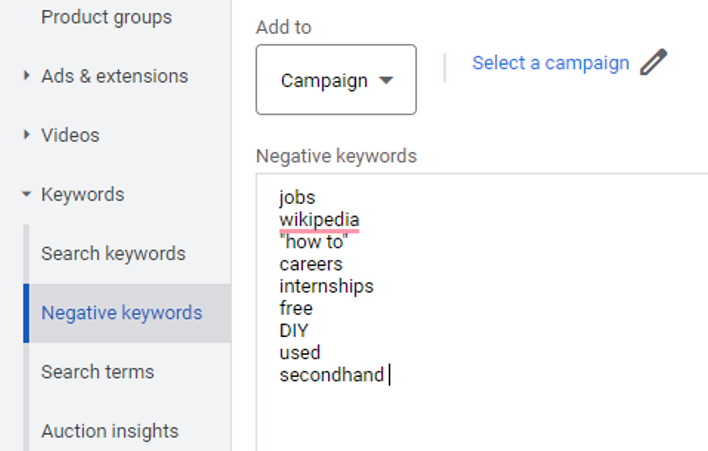
Often people don’t spend anywhere near enough time on negative keywords, as they’re an incredibly important part of minimising wasted spend. Even if you’re using exact match keywords, Google will serve your ads to searches that are close variants. Therefore, by frequently analysing search queries, you can identify both irrelevant searches and ranking opportunities for new keywords.
Examples of Common Negative Keywords for Google Ads:
Often people will be searching for your brand or service, but may not be looking for a product or service. Instead they may be looking for jobs, used items or even a free trial. If none of this is relevant for your business, consider adding it as a negative keyword.
Testing with Google Ads
If you notice that a particular keyword, search term or ad isn’t working well, or is using most of your budget consider adding it to its own ad group to monitor the budget and results more closely.
Want to know whether your Google Ads campaigns are working for you? We are offering a free Google Ads Audit from our experienced team of digital marketers!
It is essential to get all of these steps right first-time, as a well structured Google Ads campaign will make everything much easier later on.
How many campaigns and ad groups should I have?
Most successful ad accounts have at least 1 – 4 campaigns and usually at least 2 ad groups within each campaign, however this completely depends on your industry, products and budget. If you have a larger budget, you may be able to experiment with more campaigns and ad groups, such as segregating via market segments and search terms. However, if you’re working with a smaller budget, it may be worth keeping the campaigns and ad-groups to a minimum, until you have a proven ROI and can re-invest in more with a bigger budget.
What is the best structure for my Google Ads account?
You should always start with the most simple, uncomplicated structure, segregated by the most significant differentiator and then optimise from there. It may be that you decide on a different structure once you have reviewed the data after a month or two.
Whilst it depends completely on the type of business and budget, here are some of the following ways you may want to segregate at each level.
Campaign Level
Location – one of the most popular and effective. Maybe you’re a car dealership specialising several brands with several locations. In this case it may be worth considering whether the location or brand is the biggest differentiator, making the larger differentiator into campaigns (eg: London, Birmingham etc) and the smaller differentiator into ad-groups (eg: Volkswagen, Vauxhall etc).
Product/Service – conversely, you may only have one location and decide to make different campaigns for each brand, with the ad-groups representing each model (eg: Volkswagen-Campaign, Golf-Ad-Group).
If you’re unsure, a common way that people segregate campaigns is by the menus found on their website, such as different products, services and themes, this can be a great start to help you plan your campaign structure.
Ad-Group Level
You may have one ad-group for highly specific keywords, such as ‘Book MOT’ and another campaign for less specific terms such as ‘how much is an MOT?’. The shorter tail search term may be a higher cost per click, but with a higher level of intent, whilst the longer-tail may be cheaper but with less intent. By separating these into ad-groups, you can create specific adverts that are tailored towards these terms and monitor how effective they are separately.
When should I split Google Ads into new ad-groups?
Whilst you should start running ads with the most simple structure of campaigns, ad-groups and adverts, you may eventually choose to move ads into their own ad-group or campaign once you have enough data. You may split the ad into a new ad-group or campaign to:
- Build a stronger relationship between the ad and the keyword.
- Enable easier management and control.
- Enable more specific targeting.
Get a Free Google Ads Audit to see if you’re splitting your Google Ad Groups effectively!
Should I use SKAGs in my Google Ads?
Single keyword ad groups (SKAGs) are exactly what they say on the tin, an ad-group with just a single keyword in it. There are valid arguments for and against SKAGs, so here’s an overview of our take on them.
Benefits of using SKAGs
The argument for SKAGs is to ensure that keywords match the adverts, which is incredibly important in maintaining a high relevance and quality scores. In theory, by closely matching keywords, ads and landing pages, the user experience will be enhanced, which may lead to higher conversion rates. This has rang true for several years, however, over the past few years the usefulness of SKAGs has dropped.
Disadvantages of using SKAGs
Google’s ‘exact match’ keyword type is no longer exact and will show for several other terms relating to the keyword, essentially making the data found in ‘SKAGs’ less useful, with a high likelihood of crossovers between ads.
Despite what many will tell you, the key to efficient and well optimized Google Ads is simplicity. Having too many ad groups in your account may make the account difficult to manage, making optimizations tricky as the data is spread thinly across several campaigns.
Using SKAGs with Google Ads Smart Bidding
Spreading ad-groups too thin also often means there isn’t enough data to make decisions. Therefore, it has been found that Google Ads Smart Bidding works better when there is a wider variety of keywords within each ad-group.
In conclusion, for larger accounts with lots of data there may still be some advantages to using SKAGs, as separating high traffic keywords from lower traffic ones may enable more close monitoring of performance for these keywords. However, this won’t be necessary for all keywords and doing this when it isn’t needed will lead to a cluttered account that isn’t providing enough data to make actions on.
Therefore, finding the right balance between simplicity and separation is essential in optimizing for performance.
Free Google Ads Audit!
Are you certain that your Google Ads are running as efficiently as possible? Why not request a free Google Ads audit to receive professional insights on how to improve the efficiency of your Google Ads account!
Google Ads Training
Your Google Ads account structure is only part of the puzzle! Campaigns will only convert if your messaging, USP and landing pages are coherent and convincing. Alongside expertise in optimisations, these are areas where a PPC Agency can be useful in making the most out of your budget, ensuring that every aspect of your campaign is tied together for a seamless customer experience.
Although PPC Agencies are great for implementing the best practices for Google Ads, you may instead prefer to train up your in-house marketing team on running the campaigns themselves.
As well as delivering ROI-focused digital marketing, at Key Principles we offer over 20 years of experience in industry-leading PPC Training to companies far and wide, helping them to grow their teams and become more profitable.
We are currently offering a free digital marketing training consultation, providing you with areas where you may be able to improve your team’s performance!