If you’ve delved into SEO for your business, you’ve probably heard the term page speed (sometimes called loading speeds). Or more specifically, page speed for SEO. You may have a rough idea of what this means, but don’t really understand how it works, and the benefits of monitoring this key metric.
Luckily, I know a thing or two about page speed for SEO and I want to share my knowledge with you. In the below article, you can learn why page speed is important, how it can be measured, and the different factors that can cause your website to load slowly.
Why is Page Speed Important for SEO?

To start we need to determine what page speed is. You can learn more about it in our Ultimate Free SEO Guide, but here’s a simple explanation. Page speed measures how fast the content of your web pages loads (by loads we mean when you can physically see and interact with the elements on the page).
Simply put, faster page speeds are better. They are better for the following reasons:
Page Speed is a Known Ranking Factor with Google
Google often likes to keep its ranking factors secret so we can keep guessing. However, it’s rather explicit on page speed. Google uses page speed as a signal and it can affect into how high your website ranks on SERPs.
Because Google explicitly states page speed for SEO is important, we don’t want to ignore that. This is because Google is the most popular search engine and a good chunk of your traffic is generated from their search results, including your local SEO efforts.
Slow Loading Speeds Give a Poor User Experience
I’m sure you’ve had this experience and found it frustrating, and I know how much it irritates me. You open your web browser, type in a website address… and nothing happens. You sit there faithfully, waiting for something to show on your screen. All you get is an empty void or a slow trickle of text and images.
What do you do? I usually close the website and load Google to find an alternative.
Slow page speeds cause higher customer frustration and bounce rates. With so much information at our fingertips available on the internet, we don’t want to wait. If a site loads slowly, we go elsewhere.
They are Also Detrimental to Conversion Rates
Perhaps your homepage loads like lightning. But what about your other content? Can your customers easily add items to their shopping cart of your online store or find the information they need? Page speed is not only vital for user satisfaction, but there is a direct correlation with conversion rates. Slow page speeds lead to lower conversion rates.
How Can You Measure Your Page Loading Speeds?

You now understand the importance of page speed for SEO, but how can you measure it? While it’s possible to simply test your website manually, I advise learning about Google’s Core Web Vitals, and using a selection of page speed testing tools for more accurate and meaningful results.
Understand Google’s Core Web Vitals
To make things easier, Google has three key metrics it uses to measure page speed:
- LCP – Largest Contentful Paint. This metric looks at how long your main page content loads. Google recommends it should be less than 2.5 seconds.
- INP – Interaction to Next Paint. This is the delay before a user can fully interact with the webpage. Google recommends it should be less than 200 milliseconds.
- CLS – Cumulative Layout Shift. This is how often users see website layout shifts. Google recommends the CLS score should be 0.1 or lower.
These are incredibly logical. For example, the quicker your main page content loads (LCP), the quicker customers can find what they want. Similarly, if the information is presented quickly, but the user has to wait seconds to interact with your website, they will get frustrated. Also, a website that continually changes its layout is confusing and customers may struggle to find the info they need.
Google Search Console allows you to check your Core Web Vitals. It’s not only ideal to do this to appease Google, but also to give your customers an improved experience when using your website.
Use Tools Like Google Page Speed Insights
There is also a range of fantastic page speed tools. These are automated and all you have to do is enter your website address or page address into the relevant input box. These tools will then crawl your page and calculate your page speed, give your website a score, and outline any issues. Popular page speed tools include:
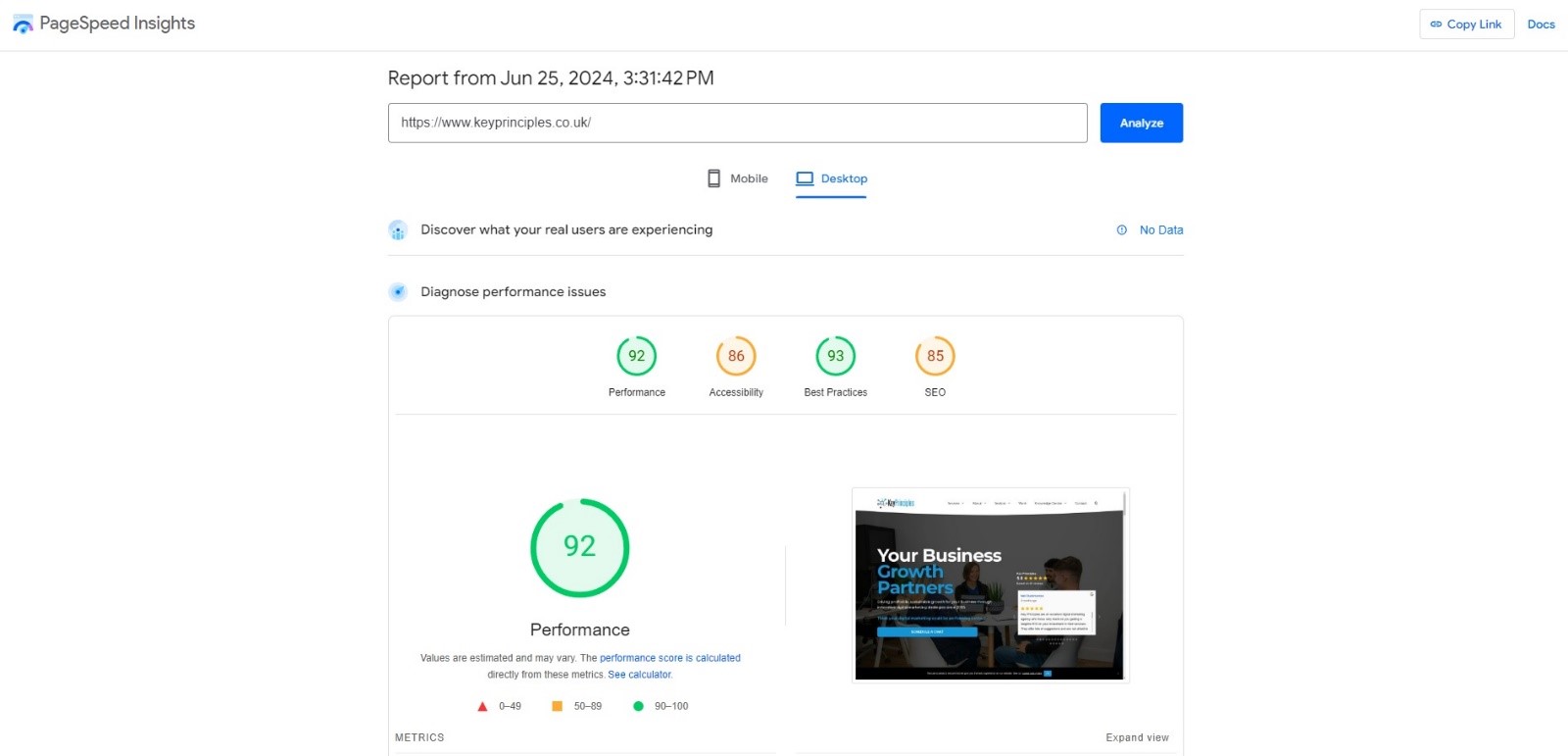
PageSpeed Insights is a great starting point as it’s easy to use and benefits from Google technology. As you can see from the screenshot below, it gives your site an overall score for performance, accessibility, best practices, and SEO.
Beneath that, you get a series of diagnostics and ways that you could improve your page speed for SEO such as JavaScript execution time, image compression and much more.
What Factors Affect Page Loading Speeds and How Can You Improve Them?
You can find more info on what affects page speeds in our free webinars, but I’ve explained five main factors below that often occur.
Image File Size

Large image file sizes are one of the most common reasons for slow page speeds for SEO. The key is finding a balance between file size and quality. Ideally, you want to use compression tools like ShortPixel to reduce file size, without causing too much degradation of quality.
Image Formats
An image can be saved as different formats. The format has rules and processes that determine how it’s displayed, etc. Some image formats are considered “light” because they utilize compression and are better suited for web use. Other image formats are not optimized for web usage and can result in slower loading times.
Popular image formats for web use include:
- JPEG/JPG: Has one of the smallest file sizes due to compression. Great for photographs.
- PNG: Allows transparency. Also uses compression and is better for screenshots, logos, and high-ref images.
- WebP: Up to 3x smaller than JPEG and PNG. Becoming more popular for web usage and will eventually become the standard. However, consideration must be given as WebP browser support isn’t universal although global usage for WebP is now up to 96%.
JavaScript, CSS, and HTML Code Quality
JavaScript, CSS, and HTML are vital code that makes your website function. However, poorly written code, or unnecessary code can increase page speed times.
To start, you should look at any JavaScript or other coding language used on your website. Is it necessary and is it performing a vital function? If not, disable it. While it is still enabled, your customer’s web browser will still try and process the useless script function. You may not be sure on this step and require a developers help.
After this, your web developer should aim to “minify” your JavaScript, HTML, and CSS code. Minifying is the process of removing unnecessary formatting and elements in your code. By doing so, you can reduce your web page file size and increase page speed times.
Historically, developers have added these extra elements in their code to make it easier to read for humans and make it look pretty. However, this has come at the cost of file size and thus why Minifying is the way forward.
Caching
Caching is where frequently accessed pages on your site are stored in the server side cache. This allows your server to deliver the resources quicker by pulling them from the cache rather than having to process the request fully.
On WordPress websites you can enable caching via several different plugins, but for non-WordPress sites you would may need to speak to your hosting company / web developer to get this enabled.
Website Server Capabilities
Your website is most likely hosted by a third-party provider. Not all hosting providers are good. Some use older hosting technologies or don’t give your website enough resources to execute fast page speeds. Make sure you shop around and find a hosting provider that gives minimum downtime and guaranteed server resources.
Also, consider utilizing a CDN service (Content Delivery Network), particularly if you have visitors to your site from all over the world. A CDN is a group of hosting servers globally distributed and stores cached versions of your pages. When a user loads your website, the CDN sends your website data from the closest geographical server to the customer. This means that your site is always loaded as quickly as possible – regardless of the customer’s physical location.
Tackle Your Page Speed Score and Improve Your SEO Today
I hope you have found this guide on page speed for SEO beneficial. The next step is to use one of the tools I recommended to evaluate your loading speeds. Start with PageSpeed Insights and look at the recommended diagnostics.
From there, if you need help, please contact us and we can help improve your loading speeds. Reducing page loading speeds often requires technical knowledge and it can be difficult to know where to start, so an experience digital marketing agency can do the hard work for you.